Table of Contents
For decades, the promise of the digital office was that technology would make our lives easier. Instead, many of us ended up as glorified traffic controllers for our own applications. We spend our mornings reconciling spreadsheets, our afternoons chasing email threads, and our evenings wondering where the actual “work” went. The tools were supposed to serve us, yet we became the connective tissue between disconnected software.
In 2026, the narrative has shifted. We are moving past the era of manual digital labour and into the age of the autonomous environment. Learning how to build an intelligent workspace with AI automation is no longer a hobby for the tech-obsessed; it is a fundamental requirement for any professional who values their time and sanity. An intelligent workspace is one where the low-value, repetitive tasks are handled by silicon, leaving the high-value, creative, and strategic tasks to the human in the chair.
This is not about replacing your job with a robot. It is about upgrading your surroundings so that your environment anticipates your needs. Whether you are a solo consultant or a lead strategist at a multinational firm, the principles of AI-driven automation can be applied to create a “second brain” that manages the noise so you can focus on the signal. Let us explore the architecture of a truly smart workspace.
The Foundations of an Intelligent Workspace
To build something intelligent, we must first understand what makes a workspace “dumb.” A traditional workspace is reactive. You wait for a notification, you process the information, you manually move that information to another app, and you repeat. An intelligent workspace is proactive. It recognises patterns, moves data without being asked, and surfaces insights before you even realise you need them.
The core of this transformation lies in the integration of generative AI with traditional automation triggers. While simple automation says “if this happens, then do that,” AI-enhanced automation says “if this happens, understand the context, summarise the intent, and execute the most logical next step.” This subtle shift is what separates a cluttered digital desktop from a streamlined command centre.
The Architecture of Flow
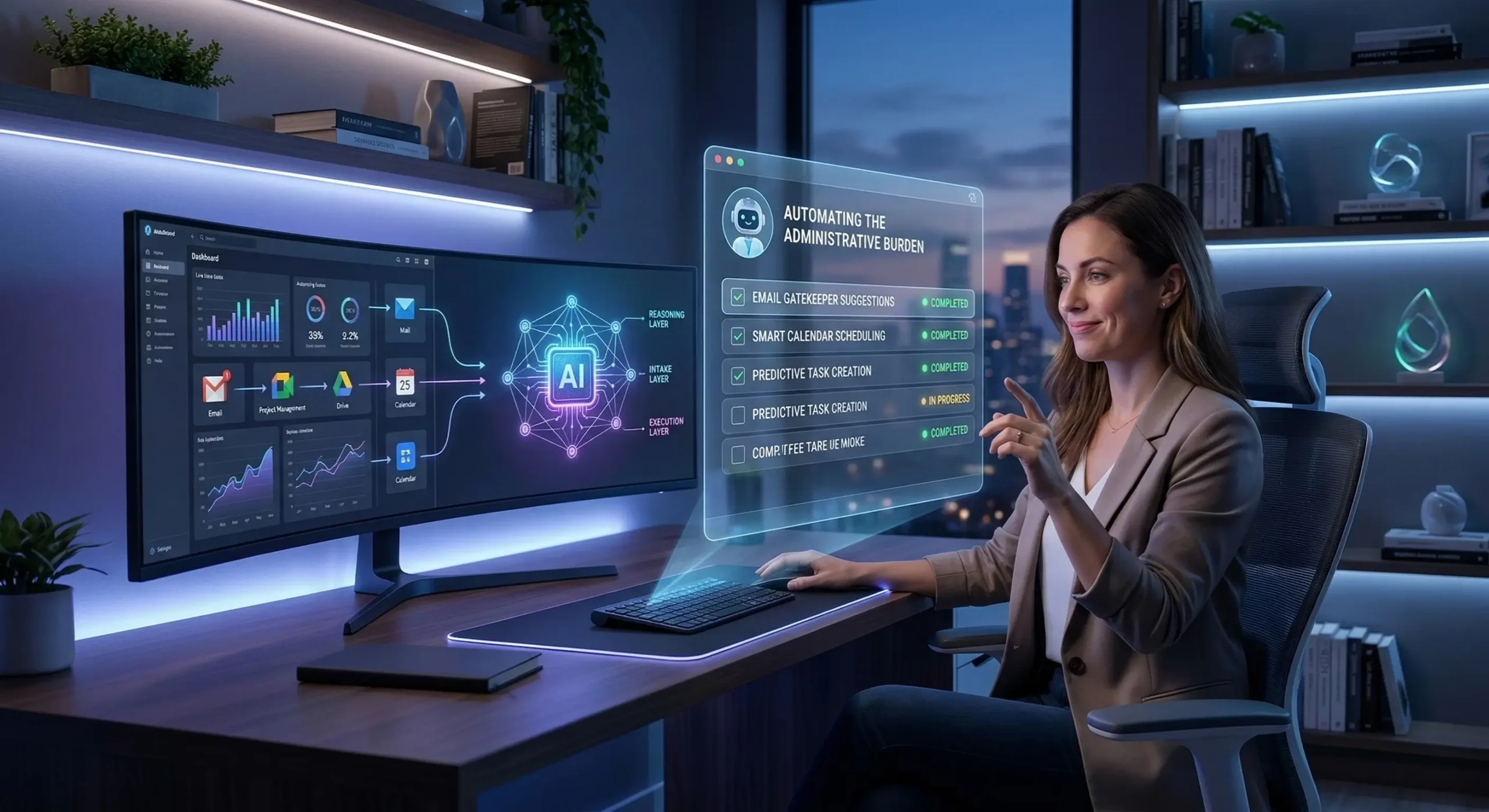
An intelligent workspace relies on three distinct layers of technology working in harmony. If any of these layers are missing, the system collapses back into manual labour.
- The Intake Layer: This is how information enters your world. It includes emails, Slack messages, meeting notes, and web research. An intelligent intake layer filters the junk and categorises the vital.
- The Reasoning Layer: This is where the AI lives. It analyses the intake, determines priority, and prepares drafts or summaries. It is the bridge between receiving data and taking action.
- The Execution Layer: This is where the work gets done. It includes your calendar, your task manager, and your publishing tools. The execution layer should ideally be updated automatically by the reasoning layer.
Automating the Digital Administrative Burden
The biggest drain on modern productivity is “work about work.” This includes scheduling meetings, filing documents, and the endless search for that one specific attachment from three weeks ago. When you learn how to build an intelligent workspace with AI automation, these are the first tasks to be offloaded.
Intelligent Communication Management
Email is the primary source of digital friction. Most of us treat our inbox as a to-do list that anyone in the world can add to without our permission. AI automation can change this by acting as a digital gatekeeper. Modern AI agents can scan incoming mail, identify the intent, and suggest a response based on your previous writing style and availability.
For example, if a client asks for a project update, an automated system can pull the latest status from your project management tool, draft a concise summary, and leave it in your “Drafts” folder for a final 10-second review. This transforms your role from a writer to an editor, which is a far more efficient use of your cognitive energy.
The End of Manual Scheduling
The back-and-forth of finding a meeting time is a relic of the past. An intelligent workspace uses AI-driven calendars that don’t just show when you are “busy,” but understand when you are “productive.” These tools can protect your deep-work blocks by automatically deflecting non-urgent meeting requests to times when your energy levels are historically lower.
Furthermore, these tools can now handle complex rescheduling. If a high-priority meeting is booked, the AI can automatically move your lower-priority tasks and notify the relevant parties, all without you lifting a finger. This is the difference between a static calendar and a dynamic schedule.
Advanced Workflows: From Task to Insight
Once you have handled the administrative basics, you can begin to automate the actual processing of information. This is where the “intelligence” of your workspace truly begins to shine. It is about creating a system that learns from your data.
Automated Research and Synthesis
In a professional setting, we are constantly consuming information to stay relevant. An intelligent workspace automates the gathering of this knowledge. You can set up “watchdog” AI agents that monitor industry news, academic journals, or competitor websites. Instead of giving you a list of links, these agents provide a daily executive summary of what changed and why it matters to your specific goals.
This synthesis capability extends to your own internal meetings. We have all sat through hour-long calls only to forget the key decisions by the following Tuesday. AI transcription and summarisation tools can now automatically extract action items, assign them to team members in your project management software, and archive the searchable transcript in your knowledge base.
Predictive Task Management
Standard to-do lists are where productivity goes to die. They are often just long, unprioritized scrolls of guilt. In an intelligent workspace, your task manager is connected to your communication and data layers. If an AI detects a commitment you made in a Slack channel, it can automatically create a task, estimate the time required based on similar past tasks, and slot it into your calendar.
This level of integration ensures that nothing falls through the cracks. It also provides a realistic view of your capacity. If your AI knows you have 15 hours of work planned for a day with only 8 hours of available time, it will flag the conflict before you start your morning, allowing you to re-prioritise before the stress sets in.
Common Mistakes When Implementing AI Automation
The road to an intelligent workspace is paved with good intentions and poorly configured API keys. Many people dive into automation and end up creating more work for themselves than they saved. Understanding these pitfalls is essential.
The Over-Automation Trap
Just because a process can be automated doesn’t mean it should be. The most common mistake is automating tasks that require high levels of emotional intelligence or nuance. For example, automating all of your LinkedIn networking messages often leads to “uncanny valley” interactions that can damage your professional reputation. Automation should handle the logic; you should handle the soul.
Ignoring the Data Foundation
AI is only as good as the data it can access. If your files are scattered across four different cloud drives, three physical devices, and a random assortment of sticky notes, your AI will be perpetually confused. Building an intelligent workspace requires a period of “data hygiene” where you centralise your information so the automation layers have a single source of truth to draw from.
Failing to Audit the System
Automation is not “set it and forget it.” Apps update, APIs change, and your own workflows evolve. A common challenge is the “broken link” syndrome, where an automated workflow fails silently, and you don’t realise it until a deadline has passed. An intelligent workspace requires a brief weekly audit to ensure the pipes are still connected and the outputs are still accurate.
Best Practices for a Seamless AI Workspace
Building an intelligent environment is a marathon, not a sprint. To ensure long-term success and avoid burnout, follow these experience-based best practices.
- Start with the Bottlenecks: Don’t try to automate your entire life on day one. Identify the one recurring task that you hate the most—the one that feels like a waste of your talents—and automate that first.
- Maintain the “Human in the Loop”: For any external-facing automation, always include a review step. Let the AI do 90 per cent of the work, but ensure a human provides the final 10 per cent of polish and approval.
- Prioritize Privacy and Security: When connecting AI to your workspace, ensure you are using enterprise-grade tools that do not use your proprietary data to train their public models. According to researchers at Harvard Business Review, data security is the number one barrier to successful AI integration in the workplace.
- Document Your Automations: As your system grows, you will forget how things are connected. Keep a simple “map” of your automated workflows. This is invaluable when you need to troubleshoot or upgrade your stack.
- Use Low-Code Tools First: You don’t need to be a programmer to build an intelligent workspace. Use platforms like Zapier, Make, or native AI integrations within your existing software to build your bridges.
Actionable Steps to Start Today
Ready to reclaim your time? Follow this simple checklist to begin building your intelligent workspace this week.
- Conduct a Time Audit: For three days, track every task you do that takes less than five minutes but happens frequently. These are your primary candidates for automation.
- Choose Your “Reasoning” Hub: Select a primary AI tool (like Gemini or a specialised AI assistant) that will serve as the brain of your workspace.
- Automate Your Meeting Notes: This is the easiest “win.” Use an AI meeting assistant to handle transcriptions and summaries for your next three calls.
- Set Up One “Zap”: Create a single automation that connects two apps you use daily—for example, automatically saving email attachments to a specific project folder.
- Schedule a Weekly Review: Set a 15-minute recurring calendar event to check your automations and look for the next bottleneck to solve.
Final Thoughts: The Future of Professional Agency
The transition to an intelligent workspace is about more than just productivity; it is about professional agency. By mastering How to Build an Intelligent Workspace with AI Automation, you are effectively buying back your focus. We are entering an era where the most successful individuals will not be those who work the hardest, but those who orchestrate their environment the most effectively.
An intelligent workspace is a living system. It will grow as you grow, becoming more refined and intuitive over time. Do not be discouraged by the learning curve. Every minute you spend setting up a smart workflow today will be returned to you tenfold in the months to come. The future of work isn’t just “faster”; it is significantly more thoughtful. It is time to let the machines handle the mundane so you can get back to being brilliant.